Why can’t AI crawlers see JavaScript-rendered content?
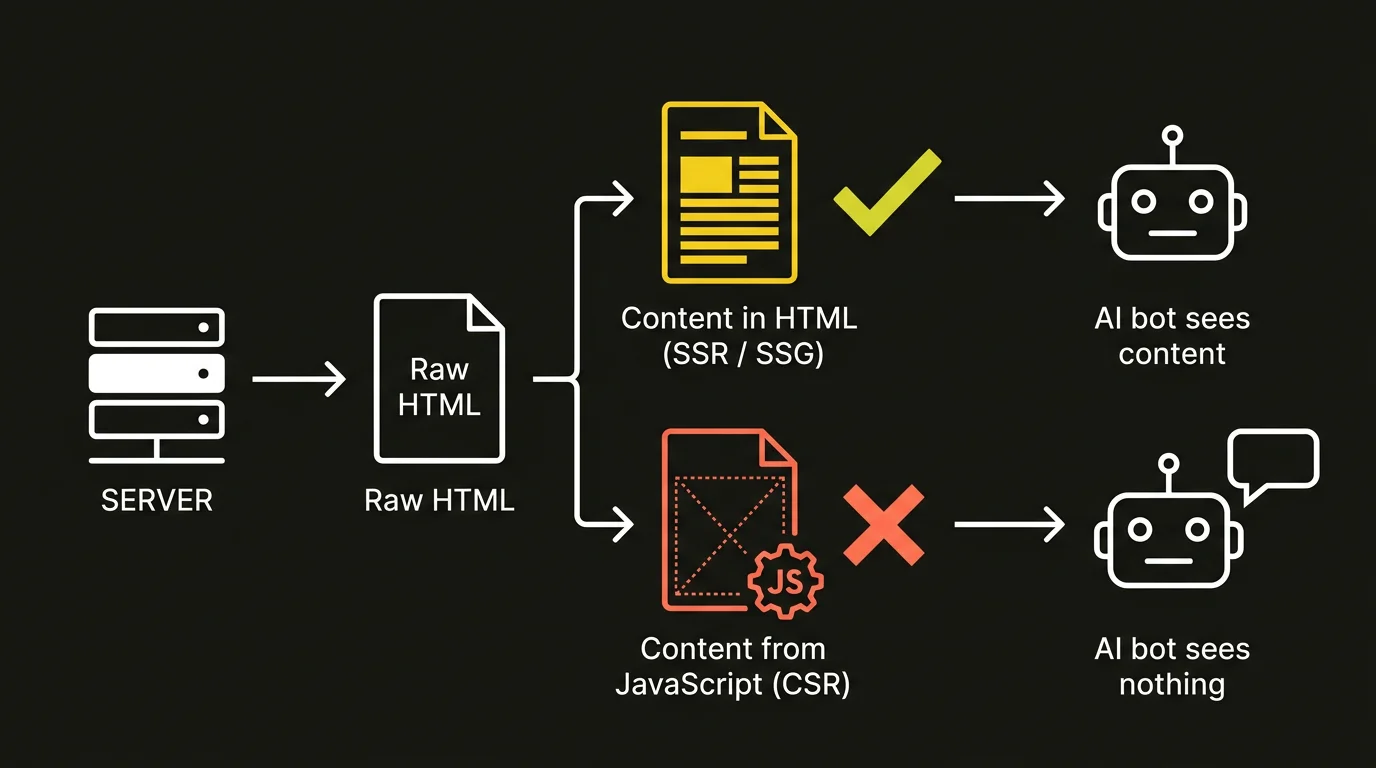
AI crawlers can’t see content that is rendered only in the browser because none of the major AI crawlers execute JavaScript — they read only the raw HTML the server returns in its first response. Server-log analysis confirms it: in the Vercel and MERJ study (2024), which covered roughly 569 million GPTBot requests and 370 million Claude-bot requests per month, none of the major AI crawlers — GPTBot, OAI-SearchBot and ChatGPT-User (OpenAI), ClaudeBot (Anthropic), Meta-ExternalAgent (Meta), Bytespider (ByteDance) and PerplexityBot (Perplexity) — rendered any JavaScript.
The consequence is simple and expensive. If your offer, service description, product spec or article body only appears after a script runs in the browser, then for a generative engine — a system that answers with a generated response instead of a list of links (ChatGPT, Perplexity, Google AI Overviews, Copilot) — that content simply does not exist. A crawler cannot cite something it never saw.
This is not a niche edge case. The study’s authors reported that across more than 500 million GPTBot fetches they found no evidence of JavaScript execution at all (Vercel + MERJ, 2024). We frame the same problem in strategic terms in our guide to GEO (generative engine optimization), the practice of creating and optimizing content so that it gets cited and used in AI-generated answers.
What do AI crawlers actually do with your JavaScript?
AI crawlers download JavaScript files but never run them — fetching a .js file is not the same as executing it. In the Vercel and MERJ study (2024), GPTBot requested JavaScript files in 11.50% of its requests and ClaudeBot in 23.84%, yet across more than 500 million requests there was still zero evidence that any of that code ran. Seeing traffic on your .js files in server logs is the most common source of false comfort: “the bot is fetching my scripts, so it must be rendering them” is simply the wrong conclusion.
The difference between downloading and executing is fundamental. An AI crawler reads the HTML document exactly as it arrives from the server and does not wait for what a normal browser would only do later — pull the JS bundle, call your APIs and hydrate the page. As the researchers put it, AI crawlers can’t read client-side rendered content, and “whatever exists in the raw HTML is what they have” (Vercel + MERJ, 2024).
In practice this splits the web into two worlds. Content produced with server-side rendering (SSR — generating finished HTML on the server before sending it to the browser) is visible to crawlers immediately. Content produced with client-side rendering (CSR — building the page in the browser with JavaScript) is a blank to them. The most exposed sites are single-page applications (SPAs) built on front-end frameworks, where the server returns a near-empty HTML shell and JavaScript paints in the entire body on the user’s device — to an AI crawler, that page is effectively white.
Which AI crawlers render JavaScript, and which don’t?
The only major exception is the Google ecosystem: Googlebot renders and executes JavaScript in headless Chromium, and both AI Overviews and Gemini inherit that search infrastructure. Every other major AI crawler does not render JS — and that state has not changed in 2026 (Passionfruit, 2026). The table below lays out the declared behavior of the crawlers that matter most.
| Crawler | Owner | Executes JavaScript? |
|---|---|---|
| Googlebot (AI Overviews, Gemini) | Yes — headless Chromium, full rendering | |
| GPTBot, OAI-SearchBot, ChatGPT-User | OpenAI | No |
| ClaudeBot, Claude-SearchBot | Anthropic | No |
| PerplexityBot | Perplexity | No |
| Meta-ExternalAgent | Meta | No |
| Bytespider | ByteDance | No |
Watch out for the mental trap “Google renders JS, so I’m safe” — it fails for two reasons. First, Google is only one channel; ChatGPT, Perplexity and Copilot stay blind to your client-side content. Second, even at Google, JavaScript rendering is deferred to a separate stage: the process splits into crawling, rendering and indexing, and your page waits in a render queue (Google Search Central, 2026). JavaScript delays and complicates indexing even where it is supported.
How do you check what an AI crawler sees on your page?
The simplest test is to look at the raw HTML with JavaScript disabled — exactly what an AI crawler receives. If critical content is missing from that view, the crawler will not see it (Vercel + MERJ, 2024). Four methods, fastest first:
- curl in the terminal. The command
curl -s https://yourdomain.com/pagereturns the raw HTML from the server without running a single script. Search the output for your headline, your offer paragraphs and your key facts — if they are not there, an AI crawler will not have them either. - View page source. The browser’s “View page source” (view-source) shows the same raw document before JavaScript rebuilds it. This is not the same as the element inspector, which shows the already-rendered DOM.
- Disable JavaScript. Turn off JS execution in your browser settings and reload the page. Empty sections, vanishing descriptions and a “skeleton” with no text are exactly what AI crawlers see.
- Google’s own tools. The URL Inspection Tool in Search Console and the Rich Results Test show the rendered HTML — what Googlebot sees after executing JavaScript; Google officially recommends both for verification (Google Search Central, 2026).
Comparing the views is diagnostic: if content shows up in Google’s tools but disappears in curl and with JS disabled, you have the classic client-side rendering problem — visible to Google, invisible to AI crawlers.
For an AI crawler, your page is the raw HTML the server returns — not what the browser shows a user after JavaScript runs. If critical content is not in that first document, then for a generative engine it does not exist.
How do you fix a site so AI crawlers can read the content?
The fix is unambiguous: critical content must reach the initial HTML response from the server — through SSR, SSG or prerendering — instead of loading client-side (Vercel + MERJ, 2024). The goal is for the crawler to receive a finished document with all the content already in the first request, without having to run anything.
- SSR (server-side rendering). The server generates full HTML for every request. Best for dynamic, frequently changing content — the crawler and the user both get a complete page right away.
- SSG (static site generation). Pages are built ahead of time, at deploy, into static HTML files. Ideal for content that does not change on every visit: articles, service descriptions, documentation.
- Prerendering. A middle layer serves crawlers pre-rendered HTML while users still get the client-side version. A rescue option for existing SPAs that cannot be rebuilt quickly.
The overriding rule is independent of the technique you pick: whatever you consider critical for citation — brand name, offer, facts, numbers, contact details — must live in the raw HTML, not load via an API on the client. We map the full set of technical steps — rendering, content accessibility for bots, sitemaps, robots.txt — in our guide on how to prepare your website for generative engines.
If you are not sure whether your content is visible to AI crawlers, start with measurement: an AI visibility audit shows what crawlers actually read from your pages and which sections disappear under client-side rendering — before the fix ever reaches the developer backlog.
Don’t AI agent browsers solve this problem?
No — AI agent browsers do not replace indexing crawlers. Tools like ChatGPT Atlas and Perplexity Comet do execute JavaScript, but they are interactive sessions launched by a specific user at a specific moment, not bots that systematically index the web (Vercel + MERJ, 2024). The fact that an agent reads your client-side page on a user’s request does not mean it enters the index the engine draws on for everyone else’s queries.
Put differently: your visibility in ChatGPT, Perplexity or Copilot answers to an anonymous question depends on what the indexing crawlers gathered — and those do not render JavaScript. An agent browser is a single visit, not a channel for building your brand’s presence in generative engines. How engines decide what to surface in an answer is something we explain in how ChatGPT picks its sources.
FAQ: JavaScript and AI crawlers
Does Google see JavaScript-rendered content?
Yes, but with a delay. Googlebot renders JavaScript in headless Chromium, and AI Overviews and Gemini use the same infrastructure. Rendering is deferred to a separate stage after the page is fetched, though — the process is crawling, rendering and indexing, and the page waits in a render queue (Google Search Central, 2026). Google is also the only major exception: ChatGPT, Perplexity and Copilot do not execute JavaScript at all.
If bots download my .js files, does that mean they run them?
No. Downloading a file is not the same as executing it. In the Vercel and MERJ study (2024), GPTBot fetched JavaScript files in 11.50% of requests and ClaudeBot in 23.84% — yet across more than 500 million requests there was no evidence of any JavaScript running. Traffic on your .js files in server logs does not mean the bot sees the content those scripts generate.
What is the fastest way to check what an AI crawler sees?
Run curl -s https://yourdomain.com/page or disable JavaScript in your browser and reload — both views show the raw HTML from the server, which is exactly what an AI crawler receives (Vercel + MERJ, 2024). If critical content is missing there, the crawler will not see it, and the fix is to move rendering to the server (SSR, SSG or prerendering).